
Output date format, which date picker provides by default is: 6/9/2017
Manipulating month difference and parsing the date format to dd-mmm-yyyy, We need to add some custom function or we have to use a third-party library like moment.js.
For Example – When a candidate registers employment details, based on from date and to date, the total number of experience in months should be calculated automatically.
By using the mdDateLocal angular material component, We can parse date format and manipulate month difference.
The $mdDateLocaleProvider is the provider that creates the $mdDateLocale service. This provider allows the user to specify messages, formatters, and parsers for date internationalization.
- On the change of the date field, the date format should change to dd-MMM-yyyy. By default, the format was dd/mm/yyyy.
- Then we need to calculate the month difference between the two dates by parsing Date Format
Steps to calculate the month difference between the two dates.
HTML
<md-datepicker ng-model=”frmDate” md-placeholder=”From date”></md-datepicker>
<md-datepicker ng-model=”toDate” md-placeholder=”To date”></md-datepicker>
Step 1: Change the Date Format using a $filter and mdDateLocal.
$filter formats the date to a string for the requested format.
Syntax for the $filter
$filter(‘date’)(date, format, timezone)
Timezone (Optional)- If it’s not specified, The browser timezone will be applied.
Code Implementation
$mdDateLocale.formatDate = function(date) {
return $filter('date')(date, "dd-MMM-yyyy");
};
Step 2: Calculate the month difference between two dates
function calcDays(){
document.getElementById('diffDays').val(0);
var frmDate = document.getElementById('d1').lastChild.data;
var toDate = document.getElementById('d2').lastChild.data;
frmDate = frmDate.split("-");
toDate = toDate.split("-");
var sDate = new Date(frmDate[0]+"/"+frmDate[1]+"/"+frmDate[2]);
var eDate = new Date(toDate[0]+"/"+toDate[1]+"/"+toDate[2]);
var daysApart = Math.abs(Math.round(((sDate-eDate)/86400000)/30));
document.getElementById('diffDays').innerText = daysApart;
}
Step 3: Change date format using Filter and mdDateLocale
Without using Controller:
.run(function($mdDateLocale, $filter) {$mdDateLocale.formatDate = function(date) {
return $filter('date')(date, "dd-MMM-yyyy");
};
Injecting into Controller:
app.controller('myCtrl', function($scope , $mdDateLocale, $filter) {
$mdDateLocale.formatDate = function(date) {
return $filter('date')(date, "dd-MMM-yyyy");
};
Step 4: On change of the date field, calculate the month difference between two dates
On Change, Calculate Month Difference
	$scope.frmDate = '';
		$scope.toDate = '';

		$scope.$watch('frmDate', function(newVal) {
			  var startDate = $filter('date')(new Date(newVal), "yyyy-MM-dd");
			//alert(startDate);
			document.getElementById('d1').innerText = startDate;
			calcDays();
		});
			$scope.$watch('toDate', function(newVal1) {
			   var endDate = $filter('date')(new Date(newVal1), "yyyy-MM-dd");
				//alert(endDate);
				document.getElementById('d2').innerText = endDate;
				calcDays();
			});
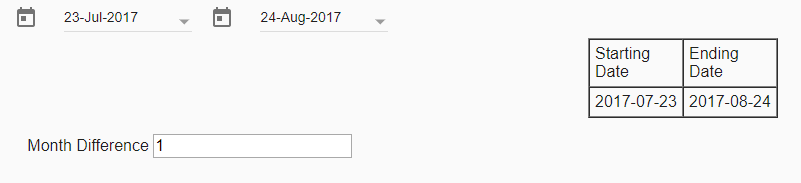
Here is the screenshot which displays the sample output.