

Let’s consider the event registration form, User has to enter their city name for the event registration. Some user will register their City by typing Bangalore and some users will register their city by typing Bengaluru. Same cities will have multiple names.
If website visitors / admin wants to check the event registration details by city wise, they will search the city using the keyword Bengaluru or Bangalore. Whether the visitors search the city by Bangalore or Bengaluru, Same results should appear.
Some cities that has the Dual / Multiple names. For example,
- Bengaluru / Bangalore
- Chennai / Madras
- Calcutta / Kolkata
- Gurugan / Gurugram
- Mumbai / Bombay
There is a concept called filtering entries in Formidable Form Views to filter the entries.
How to add a filter?
Create Search By City Form with input field and add the parameter /?city=[301 show=id] as shown on the screenshot.
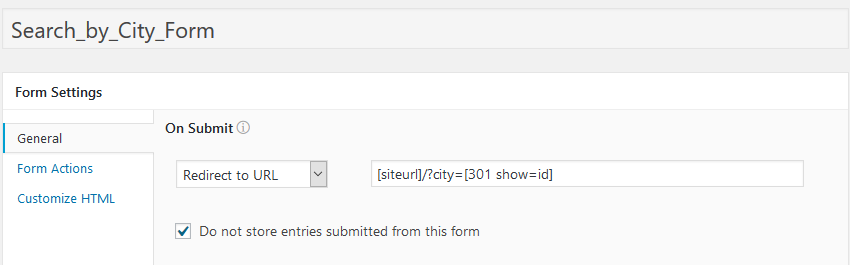
To filter the Event Entries, Create a View and add the parameter [get param=city] as shown on the screenshot.

Sample Output for the Form and View.
Formidable form filtering the entries by URL parameter using formidable form Views. So we have to pass multiple parameters to the search filter.
First, I have tried using jQuery. When user submits the value in the search by city form, the page gets reloaded. After the page gets reloaded, the value which I got through the jQuery gets disappeared. So i have decided to use the Formidable Form Hooks to customize the filter.
For multiple cities, we have to implement the multiple keyword search using the add_filter hook to customize the filter.
Formidable Form Documentation for Reference – https://formidableforms.com/knowledgebase/frm_where_filter/
File Path – var/www/html/wp-content/themes/child-theme/custom_functions.php
Step 1 – Implement the basic function for the filter
Here is the code for formidable form hooks filter.
add_filter( 'frm_where_filter', 'frm_custom_or_filter', 10, 2 );

function frm_custom_or_filter( $where, $args ) {

  $view_id      = 936;// Replace with your View ID

  $field        = 288;// Replace with ID of your field

  $search_val_1 = 'Bengaluru';// Replace with the first value

  $search_val_2 = 'Bangalore';// Replace with the second value

  if ( $args['display']->ID == $view_id && $args['where_opt'] == $field ) {

$where = "( ( fi.id = " . $field . ")";

$where .= " AND ( ( meta_value like '%" . $search_val_1 . "%' )";

$where .= " OR ( meta_value like '%" . $search_val_2 . "%' ) ) )";

  }

  return $where;
}
Step 2 – Get the current page URL using PHP.
The following variable will get the current page URL.
$current_page_url = 'http://' . $_SERVER['SERVER_NAME'] . $_SERVER['REQUEST_URI'];Step 3 – Check whether the current page is event details page.
Here is the code to check the current page.
if (strpos($current_page_url,'event-entries') == true) {Step 4 – Check the condition – If the page URL contains particular city name for eg “../?happeningAt=Bangalore”
Here is the code to check whether the page URL contains the particular keyword.
if (strpos($url,'Bangalore') || strpos($url,'Bengaluru') == true) {Step 5 – If the condition (Step 3 and 4) has been satisfied do the filter for bangalore and bengaluru (Step 1).
Step 6 – Repeat the Step 4 and 5 for other cities.
Step 7 – Implement the First letter to be upper case while user typing.
jQuery Script for Capitalizing every 1st character of the string in the word when user types in search by city input text box.
Here is the code for Capitalizing the 1st character.
<script type="text/javascript">
jQuery(document).ready(function($){
	// Capitalize string every 1st character of word to uppercase
	jQuery('#field_khotz3').keyup(function() { // Input field Id
		var str = jQuery('#field_khotz3').val(); // Get the user input field value.
		var spart = str.split(" ");
		for ( var i = 0; i < spart.length; i++ ){
			var j = spart[i].charAt(0).toUpperCase();
			spart[i] = j + spart[i].substr(1);
		}
      jQuery('#field_khotz3').val(spart.join(" "));
	});
});
</script>
Here is the final sample code for the search filter customization.
<?php

$current_page_url = 'http://' . $_SERVER['SERVER_NAME'] . $_SERVER['REQUEST_URI'];

// If the Page is Event Entries Page - Condition starts here.
if (strpos($current_page_url,'event-entries') == true) {

$url = 'http://' . $_SERVER['SERVER_NAME'] . $_SERVER['REQUEST_URI'];

if (strpos($url,'Bangalore') || strpos($url,'Bengaluru') == true) {

   //filter Starts Here - Bangalore
	add_filter( 'frm_where_filter', 'frm_custom_or_filter', 10, 2 );
	function frm_custom_or_filter( $where, $args ) {
	   $view_id      = 936;// Replace with your View ID
	   $field        = 288;// Replace with ID of your field
	   $search_val_1 = 'Bengaluru';// Replace with the first value
	   $search_val_2 = 'Bangalore';// Replace with the second value

	   if ( $args['display']->ID == $view_id && $args['where_opt'] == $field ) {
			$where = "( ( fi.id = " . $field . ")";
			$where .= " AND ( ( meta_value like '%" . $search_val_1 . "%' )";
			$where .= " OR ( meta_value like '%" . $search_val_2 . "%' ) ) )";
		  }
	   return $where;
	}
	//filter Ends Here

}

else if (strpos($url,'Chennai') || strpos($url,'Madras') == true) {

	//filter Starts Here - Chennai
	add_filter( 'frm_where_filter', 'frm_custom_or_filter', 10, 2 );
	function frm_custom_or_filter( $where, $args ) {
	   $view_id      = 936;// Replace with your View ID
	   $field        = 288;// Replace with ID of your field
	   $search_val_1 = 'Chennai';// Replace with the first value
	   $search_val_2 = 'Madras';// Replace with the second value

	   if ( $args['display']->ID == $view_id && $args['where_opt'] == $field ) {
			$where = "( ( fi.id = " . $field . ")";
			$where .= " AND ( ( meta_value like '%" . $search_val_1 . "%' )";
			$where .= " OR ( meta_value like '%" . $search_val_2 . "%' ) ) )";
		  }
	   return $where;
	}
	//filter Ends Here
}

else if (strpos($url,'Calcutta') || strpos($url,'Kolkata') == true) {

	//filter Starts Here - Calcutta
	add_filter( 'frm_where_filter', 'frm_custom_or_filter', 10, 2 );
	function frm_custom_or_filter( $where, $args ) {
	   $view_id      = 936;// Replace with your View ID
	   $field        = 288;// Replace with ID of your field
	   $search_val_1 = 'Calcutta';// Replace with the first value
	   $search_val_2 = 'Kolkata';// Replace with the second value

	   if ( $args['display']->ID == $view_id && $args['where_opt'] == $field ) {
			$where = "( ( fi.id = " . $field . ")";
			$where .= " AND ( ( meta_value like '%" . $search_val_1 . "%' )";
			$where .= " OR ( meta_value like '%" . $search_val_2 . "%' ) ) )";
		  }
	   return $where;
	}
	//filter Ends Here
}

else if (strpos($url,'Mumbai') || strpos($url,'Bombay') == true) {
    //Repeat the same for other cities.
}